Chapter 13
Dream files
A Dream can be saved to one file, with the extension .dream, and handed to anyone who has Dreamer Pro. They import it into their own world and get everything the Dream needs.
What a .dream file holds#
- The Dream's timeline: every node, slide, setting and condition.
- The scene objects the Dream shows, including their models and materials.
- The recordings its Dreamwalkers play, and the avatars they play on.
- Its sounds.
- The scripts those objects need, if any. Plugin files do not travel and are refused.
A Dreamwalker's recording travels as the recording file Dreamer Pro made, with its voice; VRChat's log never travels. Videos stay links, and the link itself does not travel. Whoever imports the Dream sets their own video link in the Video panel. Intro cards do not travel either.
The file does not carry Dreamer Pro itself. The person importing it needs Dreamer Pro installed. The file remembers which version wrote it.
Exporting#
Choose Dreamer Pro > Export Dream (.dream). A list of the Dreams in your scene appears, with All and None buttons. Tick the ones you want and press Export. Export is off while Unity is in Play mode: the Export button greys out and the window says so.
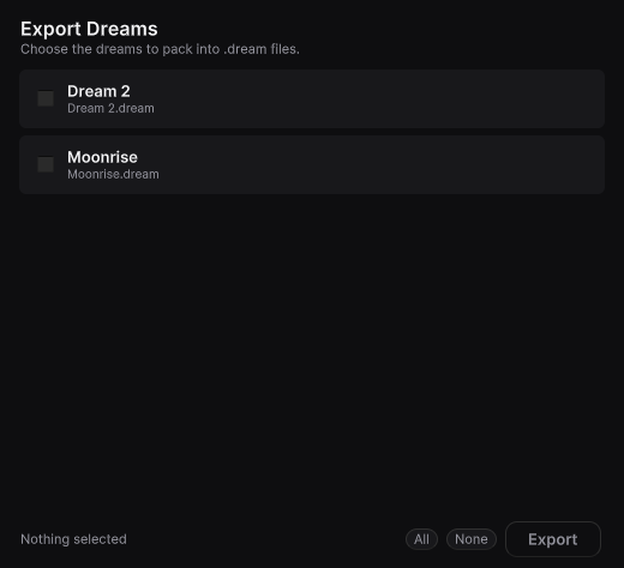
- One Dream saves as one file. A save dialog asks where.
- Several Dreams save as one file each, into a folder you pick.
- If a file already exists, Dreamer Pro asks before replacing it.
An empty Dream is a Lint error. Export refuses it too, unless the Dream plays a hosted video.
Importing#
Importing loads the file onto a Dream already in your scene. Dreamer Pro asks how: Replace or Add.
- Replace. The file takes the place of everything on the timeline. Dreamer Pro asks once more before it does.
- Add. The file's rows join what is already there, on lanes of their own, and the Dream's settings stay as they are. Its Dreamwalkers join your list. A recording made at the same time as one of yours lines up with it. Rows that start after your Dream's end are still added, and the report counts them. The Prompt track has two lanes and the Image track four, so added rows on a full one share a lane, and the report says so.
Undo takes either back in one step.
Choose Dreamer Pro > Import Dream (.dream) and pick the file. Or select a .dream file in the Project window, where it shows its own icon and a summary of what is inside, and press Import This Dream.
- The file goes onto the Dream the editor has open, or the scene's Dream if the editor is closed. The scene needs a Dream first; add one with Add Dreamer Pro to Scene.
- Everything the file brings lands under Assets/Dreams, in a folder named after the Dream. Nothing else in your project is written to, except that any sound rows join your player under its Dreamer Sounds object.
- Objects your scene already has, matched by their place in the hierarchy, are used as they are. Missing ones are added under a stage object named after the Dream. When a missing object sits inside one your scene already has, the whole thing arrives as a spare copy in the stage. Your own object is still the one the Dream drives, so the spare can be deleted.
- If the file carries scripts, Dreamer Pro asks before bringing them in.
- When it is done, a report says what came in and what, if anything, could not be found. After an Add it also says how many rows and Dreamwalkers joined.
A file that is not a .dream file, that is missing its timeline, that uses a data version this Dreamer Pro does not know, or that was written by a newer Dreamer Pro than yours, is refused before anything is written. Import can also stop later, once files have landed under Assets/Dreams and the stage is in your scene. The report says so and names what to delete. Import is off while Unity is in Play mode.
Moving a Dream between your own projects#
Export from one project, import into the other. Objects that already exist in the second scene are reused, so importing a Dream back into the world it came from adds no object twice. Choose Replace to take the whole timeline over, or Add to lay the file's rows beside what the second Dream already has.