Chapter 09
Slideshows
A slideshow is a Dream made of scenes that a presenter steps through. Each scene is a slide. Every slide is its own timeline inside the same Dream, with its own nodes, its own length and its own loop.
Turning it on#
Open the Dream's settings with the cog above the timeline and turn on Slideshow, at the top of the Video page. A row of slide tabs appears under the Dream tabs. Autoplay turns on with it, so the show starts when the world loads.
Working with slides#
- The "+" at the end of the row adds a slide.
- Click a tab to edit that slide. The timeline and the preview follow the slide you are editing. Lint reads the whole Dream.
- Hold a tab and drag it to move that slide. A line shows where it will land. Escape cancels. The slides in between keep their order.
- The gear on the slide you are editing opens its settings.

Slide settings#
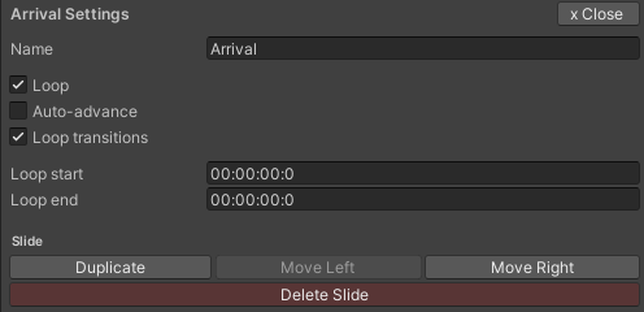
The panel is headed with the slide's name, and holds:
- Name. Shown on the tab, and under the slide controls in the world while the slide is up. Leave it empty to show nothing there.
- Loop. On by default. When the slide reaches its loop end, it plays again from its loop start.
- Auto-advance. Off by default. When the slide finishes, the show moves to the next slide on its own.
- Loop transitions. On by default. The slide's entrance effects play again on every loop. Off, they play once.
- Loop start and Loop end. Where the loop begins and where it wraps. Empty, the slide loops over its whole length.
- Duplicate, Move Left, Move Right, Delete Slide, at the bottom of the slide's settings. Delete Slide is greyed while the Dream has only one slide. Deleting asks once, says how many nodes and markers go with it, warns you if conditions elsewhere point at a prompt on it, and Undo brings the whole slide back.
When a slide reaches its end it advances if Auto-advance is on, otherwise it loops, otherwise it holds on its last frame. The last slide has nowhere to advance to, so it loops or holds instead.
In the world#
Whoever runs the show gets a small glass panel under the player controls: previous, a slide counter, and next. The slide's name shows under the counter. In VR it sits with the controls, on the wrist when they ride the hand. In a slide that holds at its end, the skip buttons stop at that end. In a Shared Dream, someone arriving mid-show lands on the slide everyone else is watching. In a Local Dream everyone starts on the first slide.
The player controls show each slide's own time. The bar spans the slide you are in, and dragging it to the end lands on that slide's end, never inside the next slide.
A viewer Who May Control does not allow gets no slide panel at all.
Nodes and slides#
A node belongs to the slide it was made on. Copy and paste move nodes between slides: Ctrl+V on another slide keeps the copied times. Duplicate Slide copies every node on it.
Lint reads the whole Dream, whichever tab is open. Two nodes on different slides that share a time can still be reported as a conflict, even though they never play together.
Where slideshows run#
A slideshow runs on Dreamer Pro's own clock. It cannot ride hosted video or hosted audio. In the Video panel choose Non-hosted playback. Lint says so if a slideshow is set to anything but Non-hosted.