Chapter 11
Sound and voice
Every sound a Dream makes lives on the Sound track. The Voice track is different: it changes how the people in the room sound to each other.
Sound nodes#
Add a Sound node and set its Audio Clip. Dreamer Pro creates and manages the audio source for you. No extra setup is needed.

A Sound node is a range clip. Drag its body to move its start. Drag its right edge to trim how long it plays.
- Play For (seconds). How long the sound plays. 0 plays the whole clip once. With Loop on, 0 loops to the end of the Dream, and any other value stops the loop after that long.

- Volume. From 0 to 1.
- Loop.

- 3D Sound. Off, the sound plays the same everywhere. On, it plays from a place in the world: a cue sound from its cue's object, an FX sound from its FX Object, a prompt sound from the prompt panel, other sounds from their 3D Position Object.

Sounds follow the video's position. Pausing or dragging the time bar pauses them, and they resume at the matching point in the clip. A viewer's own volume slider scales every Dream sound. A prompt answer sound is the one exception to pausing: it fires on the click, so pausing or scrubbing does not touch it.
The managed audio source for a 2D sound lives under the Dreamer Sounds object in the player. A 3D sound's source sits on the object it plays from. You can tweak rolloff or the mixer there. Dreamer Pro keeps placement and the 2D or 3D blend matched to your settings. For a special setup, Use Own Audio Source lets you assign any audio source in the scene, and Dreamer Pro leaves that sound's source alone. Keep Play On Awake off on it.
Cue transition sounds#
A Cue can play a sound with its entrance and its exit. In the Cue's Transition settings, turn on Sound In or Sound Out. Dreamer Pro creates a Sound node owned by that cue, anchored to the transition. It moves with the cue and is deleted with the cue. Select Sound Node on the Cue's Transition panel jumps to that sound.

The Play When slider sets where inside the transition the sound fires: 0 is the moment the transition starts, 1 is when it finishes. With no transition, Sound In plays at the cue's start and Sound Out at its end.

FX sounds#
An FX node can own a sound too. Turn on Continuous Sound and a Sound row loops for as long as the FX runs, in step with the video. Set its clip and volume on the FX node. Select Owning FX on that row jumps back to the FX.
Prompt answer sounds#
Each answer on a Prompt has a Sound checkbox. It creates a Sound node owned by that prompt, which plays when the answer is chosen.
Voice rows from recordings#
When you record a Dreamwalker performance, the microphone on your computer records with it, from the moment you press Record in the world until the take ends. The voice is cut to the performance and lands on the Sound track as a row linked to the Presence node: it moves with the node, is bounded by it, and deleting one deletes the other. The timeline draws the link between them. The row shows its waveform.
- Unlink makes it a plain sound. Link puts it back.
- The voice is 2D by default, so it sounds the same everywhere. Turn on 3D Sound to have it come from the performer's body.
- Trim the Presence node and the voice trims with it.
Why a sound plays nothing#
- No Audio Clip. Lint flags this.
- The Sound track is off. Every sound goes quiet, including cue, FX and prompt sounds. Lint flags this.
- Volume is 0. Lint flags this.
- The audio listener in the scene is missing or muted. VRChat provides one on the player camera; there should be exactly one.
The Voice track#
A Voice node changes how VRChat player voices behave while it plays. With no condition it affects every player. Add a condition to aim it at someone. A player-name condition works on both halves below. A prompt-answer condition only works on What They Hear: with one of those, the Their Voice settings apply to nobody, because only that person's own game knows their answer. The panel and Lint both say so.
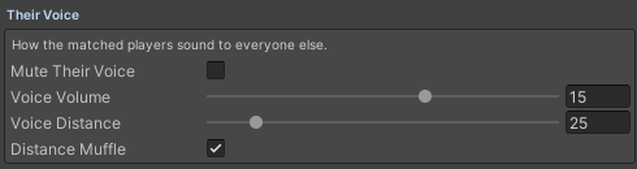
Their voice, how the matched players sound to everyone else:
- Mute Their Voice. Nobody hears them while the node plays.
- Voice Volume. How loud they are. VRChat's normal is 15.
- Voice Distance. How far their voice carries, in meters. VRChat's normal is 25.
- Distance Muffle. On is VRChat's normal far-away muffle. Off keeps them crisp at any distance.
What they hear, the matched players' own ears:
- Mute Everyone Around Them. They stop hearing other players. The Dream's own audio keeps playing.
- Echo. Everything they hear echoes: voices, sounds, and the Dream's audio. Dreamer Pro creates and manages a Dreamer Voice Echo Zone object for this. Leave it where Dreamer Pro puts it. Echo is a strong effect. On a music-heavy Dream it smears the soundtrack too, so it works best as a moment rather than a whole song.

Good to know
- When the node ends, or you scrub out of it, voices return to VRChat's normal on their own.
- Overlapping Voice nodes resolve to one winner per player: earliest start, then longest, then the lane with the higher number. Lint shows who wins.
- Echo colors the whole ear, not one voice. That is the only echo VRChat allows.